Android does not have one battery-health screen shared by every brand. Search Settings or the manufacturer's diagnostic app for Battery health or Battery status. Google documents a Battery health screen on Pixel 8a and later; other models may expose a different diagnostic or no health estimate.
Identify the exact manufacturer and model before following a battery-health path.
Before you start
Write down the model and Android version. Battery usage by app shows recent consumption, while battery health estimates long-term condition; the current charge percentage is a third, separate measure.
Check the manufacturer's diagnostic
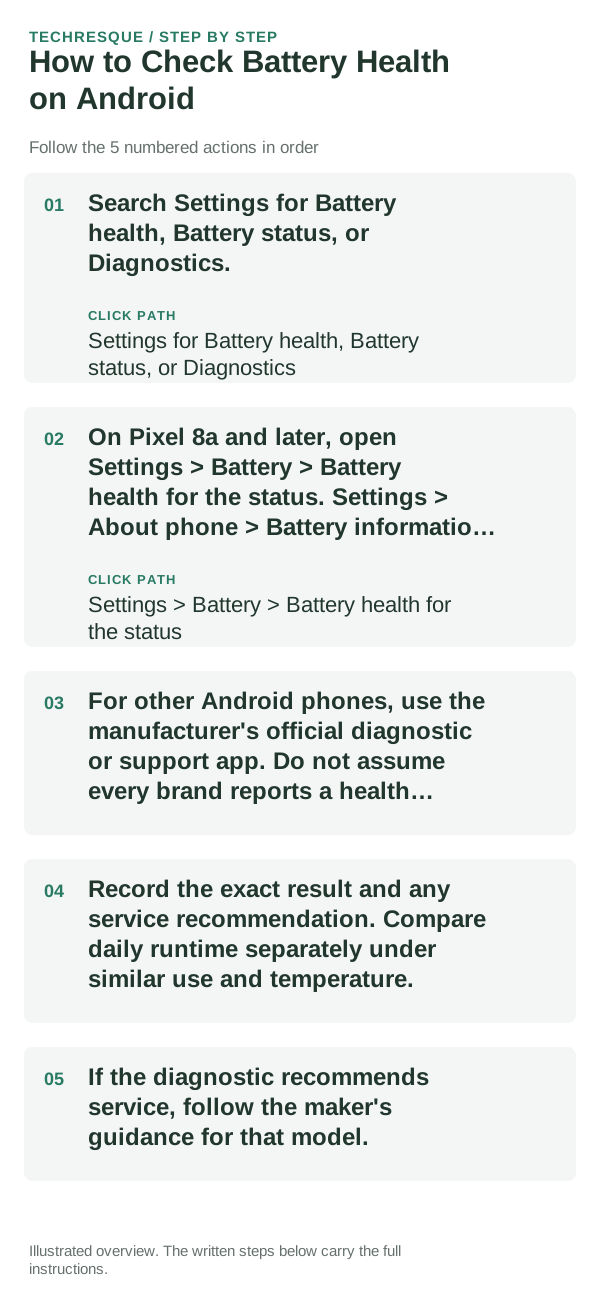
- Search Settings for Battery health, Battery status, or Diagnostics.
- On Pixel 8a and later, open Settings > Battery > Battery health for the status. Settings > About phone > Battery information shows cycle count on supported models.
- For other Android phones, use the manufacturer's official diagnostic or support app. Do not assume every brand reports a health percentage or cycle count.
- Record the exact result and any service recommendation. Compare daily runtime separately under similar use and temperature.
- If the diagnostic recommends service, follow the maker's guidance for that model.
If there is no Battery health menu
The phone may not expose a health estimate. Samsung Galaxy models can offer Battery status through Samsung Members diagnostics; other manufacturers have their own tools. Check the maker's support page for the model instead of treating an app's estimate as definitive.
Separate health from fast drain
A healthy battery can drain quickly when the screen is bright, signal is weak, an app is busy in the background, or the phone is completing work after an update. Check the built-in battery-usage view if the concern is today's runtime.
Keep the diagnostic read-only
A health check should not require changing power settings. If you adjust Battery Saver or app background access separately, note its original value and restore it if important alerts stop arriving.
When to arrange service
Use the phone maker's support route if its diagnostic flags a problem, runtime has dropped substantially under comparable use, or the device shuts down unexpectedly. Stop using a swollen, leaking, or unusually hot battery.
Frequently asked questions
Which Android phones show battery health?
Availability depends on model. Google documents the screen for Pixel 8a and later, and Samsung offers Battery status diagnostics on supported Galaxy devices. Other manufacturers differ.
Does battery usage show battery health?
No. Usage identifies which apps consumed power over a time range; health estimates condition relative to the battery when new.
When should I get service?
Follow the exact model's diagnostic and service advice. Stop using a swollen or unusually hot battery and seek professional service.
Official sources and further reading
- Google Pixel Help — Understand your Pixel battery
- Samsung Support — Check Galaxy device status and run diagnostics
Battery-health screens differ between Android brands and supported models.